
Visual story planning
Plan a novel in space before forcing it into order.
Stories rarely arrive in chapter order. Visual planning lets you keep an unfinished idea visible, move it beside the ideas it affects, and discover structure without pretending the structure already exists.
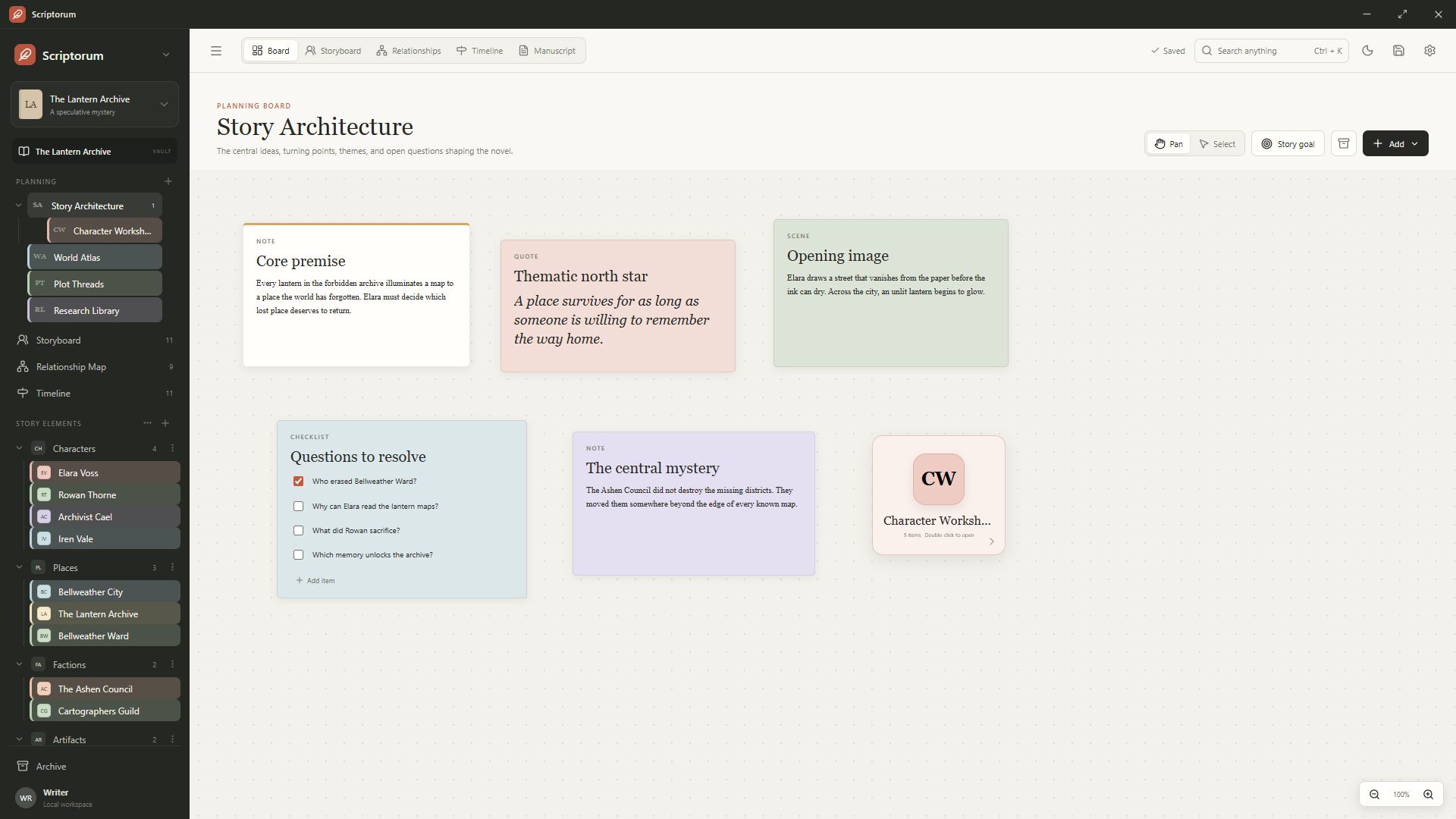
Build boards around the way you think
A Scriptorum planning board is a flexible canvas for notes, scenes, quotations, questions, checklists, links, images, files, and nested boards. Cards can be moved, resized, formatted, duplicated, locked, archived, and grouped into the arrangement that makes the book legible to you.
Use one board for a complete outline or create separate spaces for plot problems, themes, research, act structure, or a difficult sequence. Nested boards let a small card open into a deeper layer of thought.
- Freeform placement and two-axis resizing
- Zoom, pan, snapping, and alignment
- Rich text inside planning cards
- Images, files, links, and nested boards
Move from fragments to scenes
Planning does not have to begin as a formal outline. Capture the image, contradiction, or line of dialogue first. When a fragment becomes a scene, give it the structure it needs and place it beside the other moments that shape its meaning.
The same workspace can support a clean beat sheet, a dense research wall, or both. Scriptorum does not require every card to become a chapter and does not impose a fixed fiction template.
Keep planning connected after drafting starts
Planning material remains part of the book vault rather than becoming an abandoned prewriting document. Story-element profiles can point back to relevant board cards, and navigation can return you to the exact place where an idea lives.
This makes the board useful during revision, when the question is no longer what happens next but where a promise was made, why a motivation changed, or which subplot disappeared.
Common questions
What writers usually ask.
Can planning boards contain images and files?
Yes. Boards support images, files, links, notes, scenes, quotations, checklists, and nested planning boards.
Do I have to use a grid?
No. Boards are freeform. Optional snapping and alignment tools can add order when you want it without defining the structure for you.